Moving From a Spreadsheet to a Church Database: A CSV Import Checklist for Planning Center and Breeze
Ministry Automation makes and sells the prompt packs linked on this page.
Two practical ways to get started with AI in your ministry
Executive Pastor AI Prompt Pack
$6.99 · one-time purchase
Complete Church Staff AI Bundle
$24.99 one-time · all 7 role packs

Church database imports: help pages read Nov 9, 2026 ET. Where this checklist comes from | Report a step that has changed
TL;DR: Both Planning Center People and Breeze import from a CSV file, and each help page has a trap. Planning Center wants a clean file, headers named like its fields and no more than 100,000 cells at once. Breeze wants you to keep every template column and clear its sample rows with right-click Delete, not the Delete key. No import was run for this page; it comes from the two help pages.
How do you import a spreadsheet into Planning Center or Breeze?
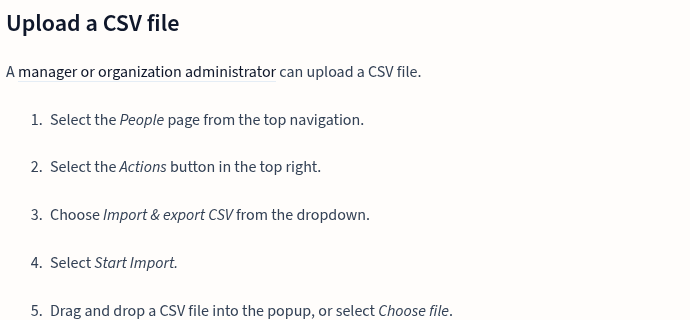
Planning Center People: go to People, choose Actions, then Import & export CSV, then Start Import, and add your file. A manager or organization administrator can do this. Breeze: go to Account Settings, then Bulk Tasks, then Import People, and download the template, which Breeze says is built from the profile fields you have set up. Each vendor's own page is the source for the steps below, read Nov 9, 2026.
Key takeaways
- Create any custom fields before you import, in both products.
- Planning Center matches your columns to People fields in a "match fields" step; Breeze gives you a template to fill in.
- In Breeze, never delete or remove the template's columns.
- Breeze's page is dated March 1, 2024, so screens may have changed since.
- Planning Center People is listed as "ALWAYS FREE" and Breeze shows a 30 day free trial.
What should you do to the spreadsheet first?
- Delete blank rows and blank columns.
- Name your column headers like the default fields in the system you are importing into. Planning Center says so on its prepare-a-CSV page.
- If some data does not fit a default field, create a custom field first. Both help pages say to add new fields before importing.
- Keep household members in the same file. Planning Center says to do this when you split a large file.
- If you have more than 100,000 individual cells, Planning Center says to "break the data up into separate CSV files."
What are the Planning Center People steps?
- Open the People page, then Actions, then Import & export CSV.
- Select Start Import and drag in the file, or choose it.
- In the match fields step, connect each column to a People field.
- Let People add missing choices if you want. For fields that already carry a list, such as a prefix, a suffix, a reason for being inactive, marital status or a membership type, and for custom dropdown and checkbox fields, People adds any choice it does not yet have on its own, and that behavior can be switched off.
The page's sidebar lists error headings, among them one about the first and last name fields being required and one about an email address with invalid formatting. We read the headings only, not the fixes.
What are the Breeze steps?
- Go to Account Settings, then Bulk Tasks, then Import People.
- Download the template and fill it in. Add new profile fields in Breeze first so they appear as columns.
- Clear the sample rows: highlight them, right-click and choose Delete. The Delete key, Breeze warns, only empties the cells and leads to trouble at import.
- Follow the field rules. Blank cells add nothing. Age is saved as a birth date in mm/dd/yyyy form, using 0000 for the year when it is not known. Family ID values tie people into one family. Texting uses the Mobile field. Several emails share one cell, separated by commas, and checkbox choices are split by a semicolon.
- Do not delete or remove the template's columns, or the import breaks.
To update people who are already in Breeze, its page points to a separate Bulk Update People article, which we did not open.
What is the catch with each?
Planning Center: the page we read lists the rules, but we did not read its table of default fields, so we cannot say which formats it expects. Its error headings come without fix text in what we read, and it caps the file at 100,000 cells before you must split it.
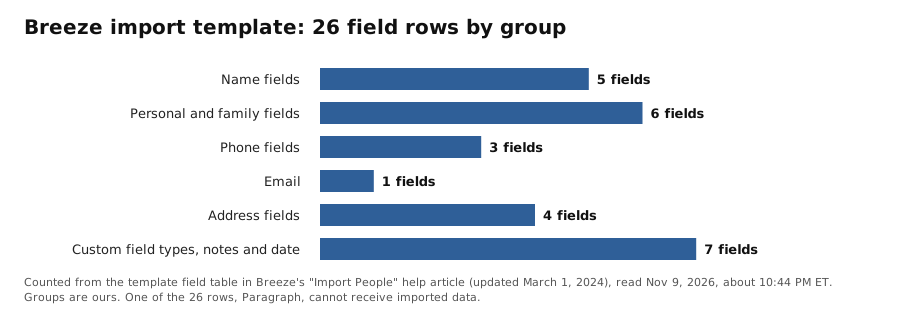
Breeze: the help article is more than two years old (updated March 1, 2024), the sample rows trap is easy to hit with the wrong key, and the template's Paragraph field cannot receive imported data. Of its 26 template field rows, the other 25 can.
What did we not check?
- Planning Center's default field table and formatting requirements.
- Any limit or error in either product beyond what the pages say. No import was run, so this checklist has no screenshots of a mapping screen and no named error from a real file.
- Planning Center's "Update data with CSV file" article and Breeze's "Advanced Importing" article.
- Whether Breeze's screens match its March 2024 page today.
- Whether Breeze's trial needs a card; we did not read that.
FAQ
Do I need to pay to import into Planning Center People?
Planning Center's pricing page marks People "ALWAYS FREE." Giving and other products are priced separately.
Why did my Breeze import break after I cleared the sample rows?
Breeze says the Delete key only clears cells and causes issues on import. Highlight the rows, right-click and choose Delete.
Can I import long text into Breeze?
The template's Paragraph field cannot receive imported data, per Breeze's help page.
Keep reading
- Church database management: keeping the records clean after the move
- Church membership management software: tools for the member list itself
- Best church management software: choosing the system before you import
- Attendance tracking software: counting heads once people are in
- Visitor follow up system: what to do with first-time guests
- Church communication software: reaching the people you just imported
- Built by a Pastor, for Pastors: how this checklist was put together
Help pages read Nov 9, 2026 ET: Planning Center, import a CSV file in People, Planning Center, prepare a CSV file and Breeze, Import People.
Last checked: Nov 9, 2026 ET. Help pages get rewritten, so compare each step with the page itself before you upload.
Ready to save time on the work that repeats every week?
Executive Pastor AI Prompt Pack
Ready-to-use prompts for church administration, operations, planning, volunteer coordination, and practical staff workflows.
Complete Church Staff AI Bundle
All 7 role-specific prompt packs for the work your church staff does every week—from pastoral care and administration to communication, youth, worship, and children’s ministry.