BoxCast vs Resi vs YouTube: What Church Livestreaming Costs Each Month
Ministry Automation makes and sells the prompt packs linked on this page.
Two practical ways to get started with AI in your ministry
Communications Director AI Prompt Pack
$6.99 · one-time purchase
Complete Church Staff AI Bundle
$24.99 one-time · all 7 role packs
Church livestreaming prices: read Nov 9, 2026 ET. Where these streaming reads come from | Report a price that moved
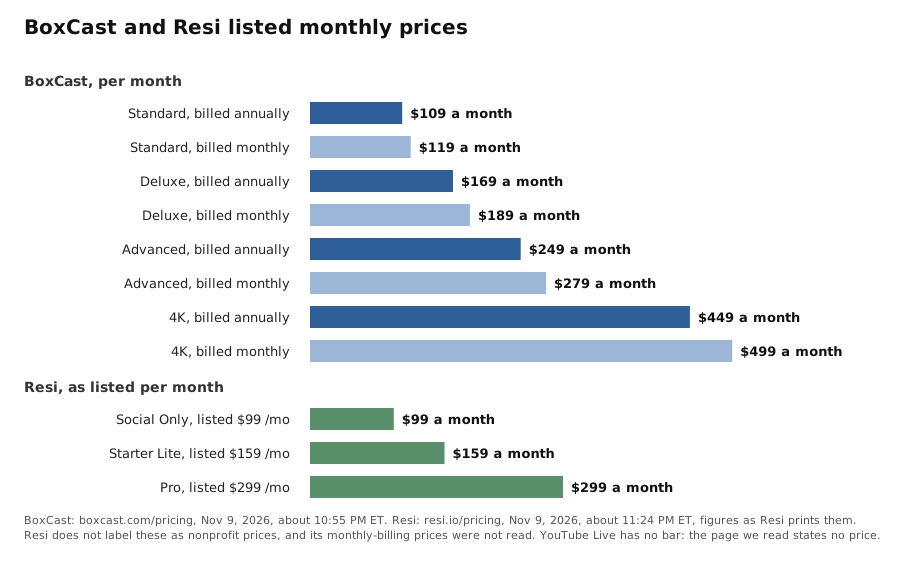
TL;DR: BoxCast lists $109 to $449 a month when billed annually and $119 to $499 billed monthly. Resi lists $99, $159 and $299 a month for its three priced plans, and its page does not call those nonprofit prices. The YouTube Help page we read gives requirements and states no price.
What does church livestreaming cost each month on BoxCast, Resi and YouTube?
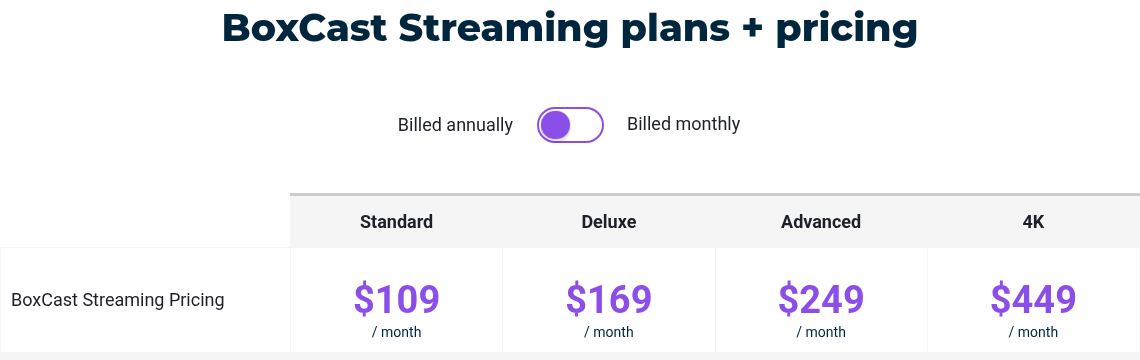
On BoxCast's pricing page, read Nov 9, 2026, the four streaming plans are Standard at $109, Deluxe at $169, Advanced at $249 and 4K at $449 a month when billed annually. Billed monthly they are $119, $189, $279 and $499. Resi's page lists Social Only at $99 a month ($1,188 billed annually), Starter Lite at $159 a month ($1,908 billed annually) and Pro at $299 a month ($3,588 billed annually), with Enterprise as custom. YouTube Live's help page says what you need to go live and does not state a price.
Key takeaways
- BoxCast's monthly billing costs $10 to $50 a month more than annual billing, depending on the plan.
- Resi's page prints its figures with no nonprofit label, so treat them as its listed prices only.
- Resi says nonprofit discounts are available if you contact sales; we did not do that.
- Each BoxCast streaming plan comes with a floor of 10,000 viewer hours per month, and BoxCast sets no cap on how many people can watch.
- This page does not cover putting a stream on your church website; that is a separate question.
What does each option include?
BoxCast lists a 30-day money back guarantee on paid plans, and every streaming plan carries a 10,000 viewer hour monthly minimum with no viewer cap. Resi's Social Only plan streams to Facebook and/or YouTube, and Starter Lite adds streaming directly to your website. YouTube Live lists four ways to stream: mobile, webcam, encoder and game console.
What does YouTube Live require?
The YouTube Help page we read says your channel must be verified and must not have had a live streaming restriction in the last 90 days. You must also be at least 16. It states no price and does not cover embedding a stream on a website, so we do not call it free or say how to embed it.
What is the catch with each?
BoxCast: the lower prices need annual billing, and the free trial comes without gear. Its FAQ says the trial covers the BoxCast platform only, and BoxCast does not supply an encoder while the trial runs. The trial length is not stated in the text we read.
Resi: its monthly-billing prices were not read, and its listed figures are not labeled as nonprofit prices. A box for nonprofit pricing was ticked in our capture, and the FAQ answer to nonprofit discounts is to contact sales. Social Only streams to Facebook and/or YouTube only; the website option starts at Starter Lite.
YouTube Live: the requirements above are the cost of entry, and the page leaves out price and website embedding.
What did we not check?
- Resi's monthly-billing prices.
- Whether Resi's figures are list prices or nonprofit prices; its text does not say.
- The price of an encoder for either vendor.
- The length of BoxCast's trial.
- YouTube's embed steps, which sit on a different help page.
- Any trial or stream. We read three pages and report them; none of the services was used.
FAQ
Is YouTube Live free for a church?
The help page we read states no price, so we cannot say. It lists requirements only.
Does Resi list a nonprofit price?
Resi's page does not label any figure as nonprofit pricing. Its FAQ says discounts are available if you contact sales.
Does BoxCast give an encoder with its trial?
No. Its FAQ says it does not provide an encoder during the trial period.
Keep reading
- Church event management software: tools for planning the service you stream
- Church website builder: a site to host the stream page
- Church communication software: getting the link to your people
- Launch a church website: a first site on a short clock
- Church automation tools: automating the weekly routine around a service
- Church management software: people and attendance records
- Built by a Pastor, for Pastors: the source of these streaming reads
Price pages we opened, Nov 9, 2026 ET: BoxCast, Resi and YouTube Help on going live.
Last checked: Nov 9, 2026 ET. Streaming plans change, so read each page again before you subscribe.
Ready to save time on the work that repeats every week?
Communications Director AI Prompt Pack
Ready-to-use prompts for newsletters, church email, social media, announcements, and clear ministry communication.
Complete Church Staff AI Bundle
All 7 role-specific prompt packs for the work your church staff does every week—from pastoral care and administration to communication, youth, worship, and children’s ministry.